TUMA
A unit manager in municipal elderly care juggles mail, staff schedules, deviation reports and Stratsys follow-up in separate systems. TUMA puts them in one workspace with an AI assistant that prepares the work and asks before anything leaves. I designed and built it as a working sales prototype with a fictional municipality.
- Role
- Product design · Build
- Platforms
- Web
- Team
- Techtify
- Made at
- Techtify Labs · in-house product
- Disciplines
- Product design · UI/UX · Accessibility · Front-end
Context
An enhetschef in elderly care starts the day in Outlook, then the scheduling system, the deviation system and Stratsys, and still has to write the APT agenda. Nothing connects, so the manager does the joining-up in their head: a deadline in three days, two urgent mails, one schedule gap.
Who it's for
Municipal staff, starting with unit managers in elderly care. The prototype is shown to municipalities as a sales tool.
Constraints
- 01It's a prototype: all data is fictional ("Exempelby kommun"), no real systems are connected, and sign-in uses demo accounts until SITHS eID exists. The product says so plainly.
- 02Public-sector software must meet WCAG 2.1 AA under the Swedish accessibility law (DOS-lagen).
- 03Work data includes personal data about staff and care recipients, so what the AI sees matters as much as what it says.
- 04Each source system has to be swappable for the real integration without touching the interface.
My role
I designed the workspace and built the prototype: the five modes, the assistant and its tools, the data layer behind it, and the plain-language information pages about AI, privacy and accessibility.
- Persona, modes and information architecture
- Assistant interaction: tools, steps and confirmations
- Accessible components: dialogs, keyboard paths, focus
- Planning view, year wheel and daily brief
- Information pages on AI, BOB, personal data and accessibility
Key decisions
The calls that shaped it
The assistant works in the open and asks before sending
- Problem
- An assistant that can edit a reply and send mail for a manager in elderly care can do real harm if it acts out of sight.
- Decision
- The assistant works on the draft that's on screen, so you watch every change and can undo it with Ctrl+Z. Each tool call shows as a step in the chat. Anything that leaves the building, like sending, stops at an inline "Godkänn / Avbryt" card. The assistant can't change other parts of the interface directly; each view registers what it will let the assistant do.
- Why
- Staff stay responsible for what goes out in their name. Seeing the work happen builds trust faster than a promise that the AI is careful.
One conversation per mode
- Problem
- A single chat thread mixes everything: triaging mail, then writing an agenda, then planning the week. The model loses track, and so does the user.
- Decision
- Dashboard, Work, Mail, Planning and Create each have their own assistant conversation and history. Entering a mode starts a fresh conversation with that page's content as context, and the previous one is kept in that mode's history.
- Why
- Context matches the task in front of you. Each mode also has its own URL, so links, the back button and bookmarks work.
Every drag has a keyboard path
- Problem
- Planning your day by dragging tasks onto a calendar is quick with a mouse and impossible with a keyboard or screen reader.
- Decision
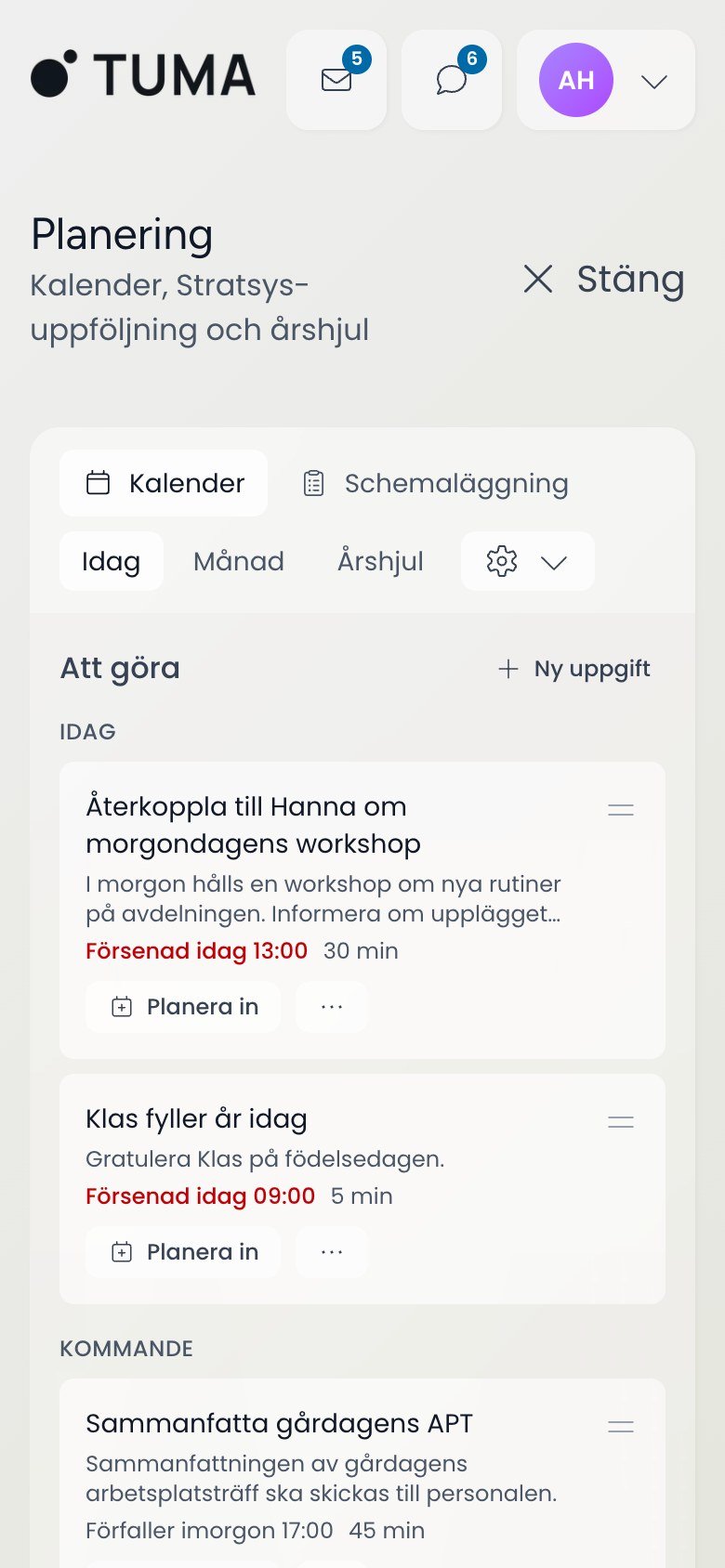
- Every task card has a "Planera in" button that opens a small scheduling form, and the day view says "drag tasks here or use Planera in". Dialogs use the native dialog element, and the confirmation dialog puts focus on Cancel first. Status is never shown by colour alone, and motion respects reduced-motion settings.
- Why
- DOS-lagen requires it, and municipal staff include people who rely on keyboards and screen readers. The keyboard path is also faster for anyone planning many tasks.
Explain what the AI sees, in plain Swedish
- Problem
- Before a municipality can use an AI assistant with care data, the people using it need to know where their questions go. That is usually buried in an agreement nobody reads.
- Decision
- Information pages inside the product explain the AI, personal data and accessibility. One page walks through BOB in five steps: names and personal identity numbers are swapped for placeholders before a question leaves the organisation, and put back in the answer. The page also says that the demo doesn't use BOB, because all its data is made up.
- Why
- Being honest about the prototype's limits makes the sales conversation more credible, not less.
Responsive
Five modes, one assistant
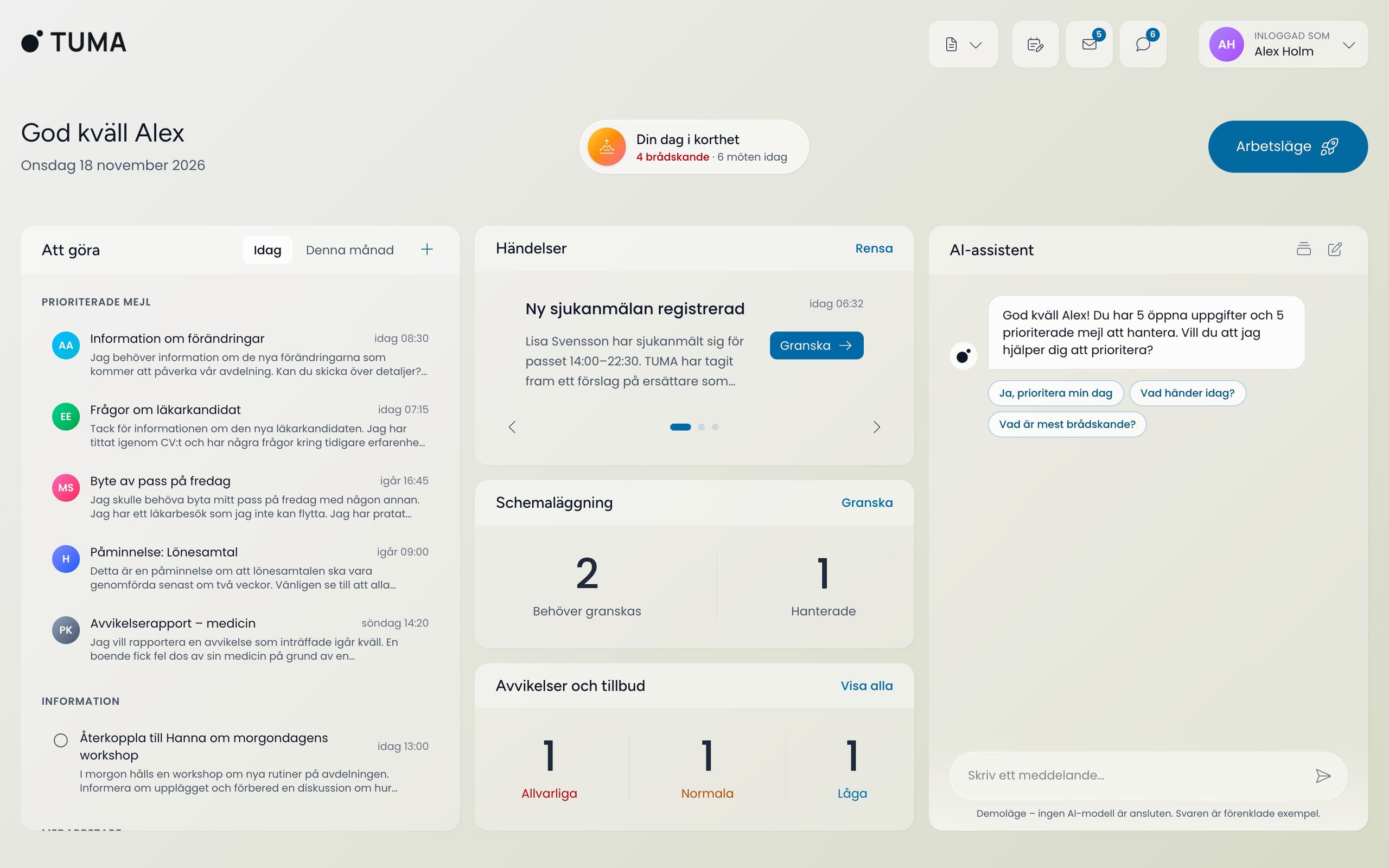
Each mode has its own AI conversation on the right and works from 360 px up. All people and messages are fictional demo data for Exempelby kommun.
"Your day in brief": prioritised mail, today's tasks and the week, in that order. · 1440 px
Design system
The system
A light, warm glass workspace with one sky blue for action. Actions use a darker shade so text keeps AA contrast.
Poppins
Interface
Figtree
Headings on information pages and the assistant
- Amber marks anything waiting for your approval
- Light and dark themes, saved per user
- Layouts work from 360 px wide; multi-column views stack on small screens
- The interface is in Swedish
Outcome
Where it landed
TUMA is a working prototype on fictional data. It runs on Vercel behind demo accounts, one per audience, so access can be revoked per meeting. Real integrations (Microsoft 365, scheduling, Stratsys), SITHS sign-in, role-based access and audit logging of AI use are designed and documented but not built. Hosting for production is still open, since municipalities often require Sweden or the EU.